


Introducing AirLink
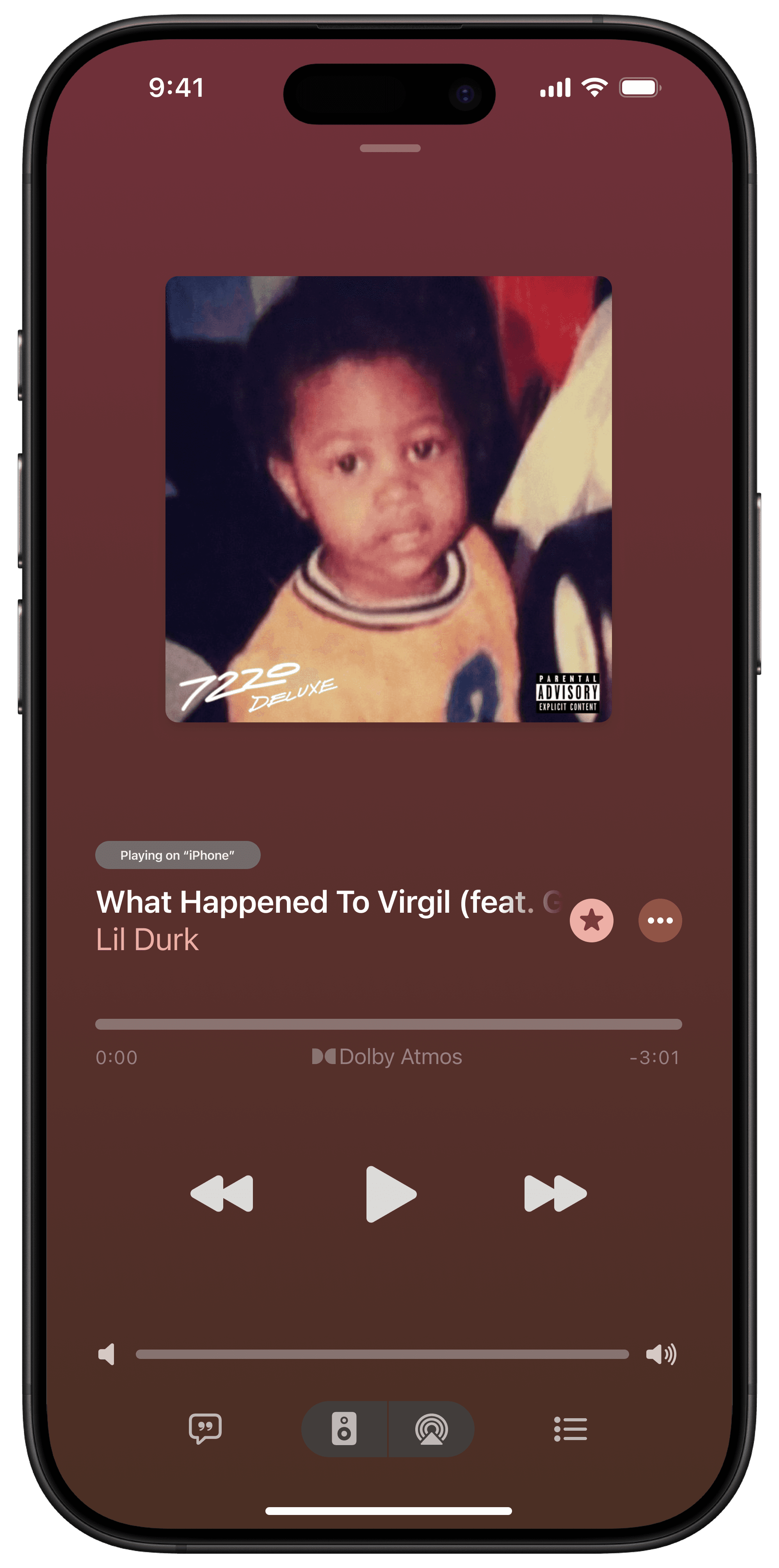
A feature that lets Apple Music users seamlessly control playback across multiple devices from a single interface
Project Duration
4 weeks
My Role
Sole UX/UI Designer
Tools
Figma, Adobe Photoshop
Introduction
Apple Music is Apple’s subscription-based music streaming service that offers access to over 100 million songs, curated playlists, live radio, and exclusive content. It allows users to stream or download music for offline listening, view time-synced lyrics, and explore music recommendations tailored to their tastes. Apple Music is deeply embedded in the Apple ecosystem, working seamlessly with Siri, HomePod, CarPlay, Apple Watch, and more. As someone who frequently uses Apple Music across multiple devices, I noticed they are lacking a feature that allows you to control the playback from your phone to the other devices. This is a feature that is found in their largest competitor and something that I have heard mentioned as a key benefit of the competitor over Apple Music.
The Problem
Apple Music users often listen on multiple devices but have no simple way to control playback between them. Unlike other streaming platforms, Apple Music doesn’t offer a built-in feature for managing playback across devices. This limitation leads to constant switching, disconnection issues, and a fragmented listening experience, especially for users who move between their phone, laptop, and smart speaker.
The Solution
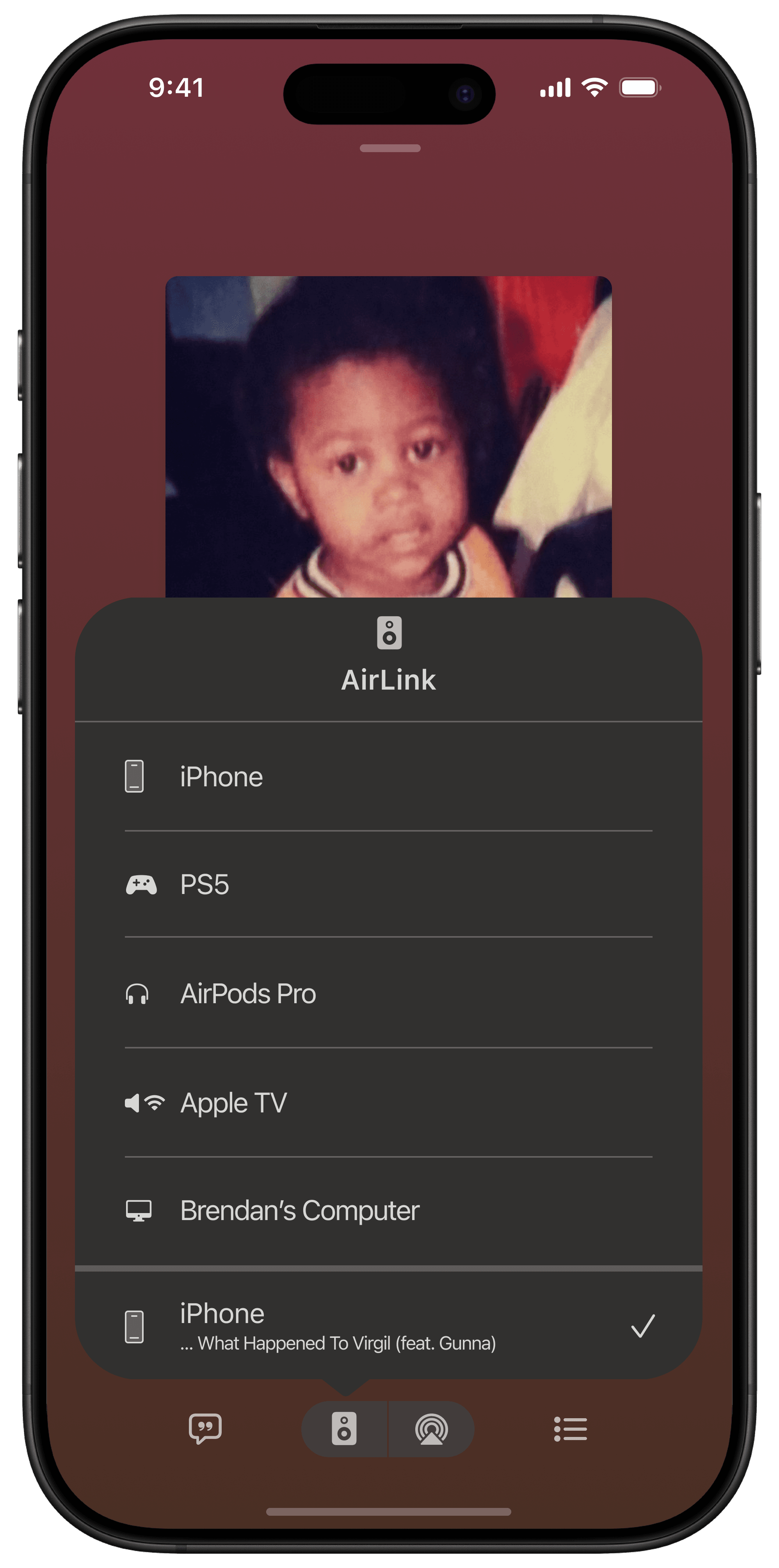
The proposed feature introduces a unified playback control system within Apple Music. Users can view all connected devices, switch playback instantly, adjust volume, and manage queues from one interface. This design creates a seamless and intuitive experience, allowing users to stay connected to their music without interruptions.
The Process
Research
Goal
The goal of my research was to understand how users listen to Apple Music across multiple devices and what expectations they have for remote playback control so that we can identify opportunities to design seamless cross-device playback features.
Research Objectives
My research objectives for Apple Music included:
Discover how users currently use Apple Music across various devices.
Understand pain points related to lack of remote control across devices.
Identify the scenarios where users want to control playback remotely.
Explore user expectations based on their experiences with competitor apps like Spotify.
Learn what device combinations users most often switch between (i.e., phone to PC, phone to PS5)
Research & Analysis Methods
Primary Research - User Interviews
To understand users’ listening habits and frustrations, I conducted one-on-one user interviews with Apple Music and other streaming platform users. These interviews explored how participants manage playback across devices, their common pain points, and what features they value most in multi-device control. The insights gathered helped identify key user needs and informed the direction of the feature design.
Secondary Research - Competitive Analysis
I analyzed Spotify, YouTube Music, and Amazon Music to understand how each platform approaches multi-device playback control. Spotify stood out for its seamless “Spotify Connect” feature, while YouTube Music and Amazon Music offered more limited or inconsistent device control options. Comparing these experiences helped highlight the gaps in Apple Music’s ecosystem and guided opportunities to design a more integrated and intuitive remote playback feature.
Define
Affinity Mapping
After completing the interviews, I created an affinity map to organize insights from participants with varying levels of experience using music streaming platforms. The notes were grouped into themes such as Listening Contexts & Device Use, Needs & Expectations, Wants & Desired Features, Frustrations, and Pain Points related to interaction and control. This process helped uncover key trends, including users’ desire for seamless device switching, frustration with stability and playback control, and interest in shared or cross-device listening experiences. These findings guided the direction of the feature design for a more connected and intuitive Apple Music experience.
User Personas
Using insights gathered from user interviews and the affinity mapping process, I developed user personas that represent the main types of listeners identified during research. These personas highlight different music habits, device preferences, and expectations for playback control. They range from casual users who value simplicity and consistency to tech-savvy listeners who want seamless connectivity across multiple devices. Creating these personas helped translate research findings into clear user needs and guided design decisions for the Apple Music remote playback feature.
Problem Statements, POV Statements & HMW Questions
Based on research insights, I defined problem statements, point-of-view statements, and How Might We questions to clearly frame user needs and opportunities. This helped guide the design direction for AirLink.
1.
Seamless music playback across devices
Problem Statement
Users who frequently switch between devices struggle with music playback that stops or restarts each time they move from one device to another. This disrupts their listening experience, interrupts focus or relaxation, and creates repeated frustration as they have to manually find their place or restart songs.
POV Statement
Sam, a multi-device listener, needs a way to continue listening to their music without interruptions when switching between devices because they frequently move between work, leisure, and gaming setups and find it frustrating to restart songs every time.
HMW Questions
How might we enable seamless playback handoff so users can switch between devices without losing their place in the music?
2.
Social collaboration features
Problem Statement
Music listeners who want to share and enjoy playlists with friends face difficulties because platforms don’t allow easy collaboration. They can’t seamlessly add, reorder, or control songs together, which makes group listening experiences less interactive, limits social engagement, and can lead to awkward interruptions or disagreements during parties and hangouts.
POV Statement
Chris enjoys sharing music in social settings but feels limited by Apple Music’s lack of collaborative features, making it hard to let friends add songs or co-control the playlist during parties or hangouts.
HMW Questions
How might we support shared playback control to make group listening more interactive and inclusive?
3.
Reliability and confidence in decisions
Problem Statement
Users listening across multiple devices often feel uncertain that their music will continue smoothly when switching from one device to another. When devices disconnect unexpectedly or playback fails to resume, it causes frustration, breaks immersion, and forces users to spend time troubleshooting or manually resuming their music.
POV Statement
Morgan often listens across HomePod, Mac, and PS5, but lacks confidence that Apple Music will keep up with them, leading to frustration when devices disconnect or playback doesn’t resume properly.
HMW Questions
How might we build trust in the cross-device experience so users feel confident that their music will follow them?
User Flows
Test
Usability Testing
This usability test evaluated how easily users could identify, switch, and control Apple Music playback across multiple devices. This included tasks such as viewing the current playback device, switching playback from iPhone to PS5, and remotely pausing playback from the iPhone while gaming.
Tasks
- Check which device the current song is playing on
- Switch music playback from current device to another, such as the PS5
- Pause music playback on your new device
Success Metrics
- Ability to complete tasks fully in a respectable amount of time
- Ability to complete tasks without requiring help
- Ability to easily understand what is being asked
- Ability to complete tasks without errors
Test Methodology
Usability testing for the Apple Music project involved 5 participants to evaluate cross-device playback interactions. Participants completed tasks designed to reflect real-world use, including checking which device music was currently playing on, switching playback from one device to another (such as a PS5), and pausing music on the new device. Sessions were moderated with a think-aloud approach, allowing participants to share their thoughts, frustrations, and strategies in real time. Observations and feedback were recorded to identify usability issues, pain points, and opportunities to improve the seamlessness of multi-device music control.
Usability Test Results
Task 1
All participants were able to determine where the music was currently playing. Some were able to find it by navigating to the music app and seeing it displayed on the “Now Playing” screen, while others could determine from the control center music widget by clicking on the speaker icon.
Task 2
All participants were able to switch the playback device, however, some took longer than others. One participant noted that they expected this to be under the AirPlay option rather than the new separate menu. They said they have experience using AirPlay to look for other devices so figured it would be under that option. Another participant took longer because they are not as familiar with iPhones and iOS as the others but eventually determined that the “speaker” icon was related to music playback devices.
Task 3
All participants were able to pause music playback on the other device from the iPhone. They utilized the music apps controls to pause playback on a secondary device. Some mentioned they just figured clicking the pause button while it indicated music was playing on another device would ultimately pause playback on that device.
Prototype
Low-Fidelity Wireframes
High-Fidelity Mockups
View Full Wireframes
Figma Prototype
Iterate
Feedback and Revisions
Insights from the usability tests informed key revisions to enhance the app’s overall functionality and user experience. Changes focused on making multi-device music control more intuitive, providing clearer feedback to users, and reducing confusion or frustration when switching playback between devices. These iterations aimed to create a smoother, more reliable, and confident listening experience across all supported devices.
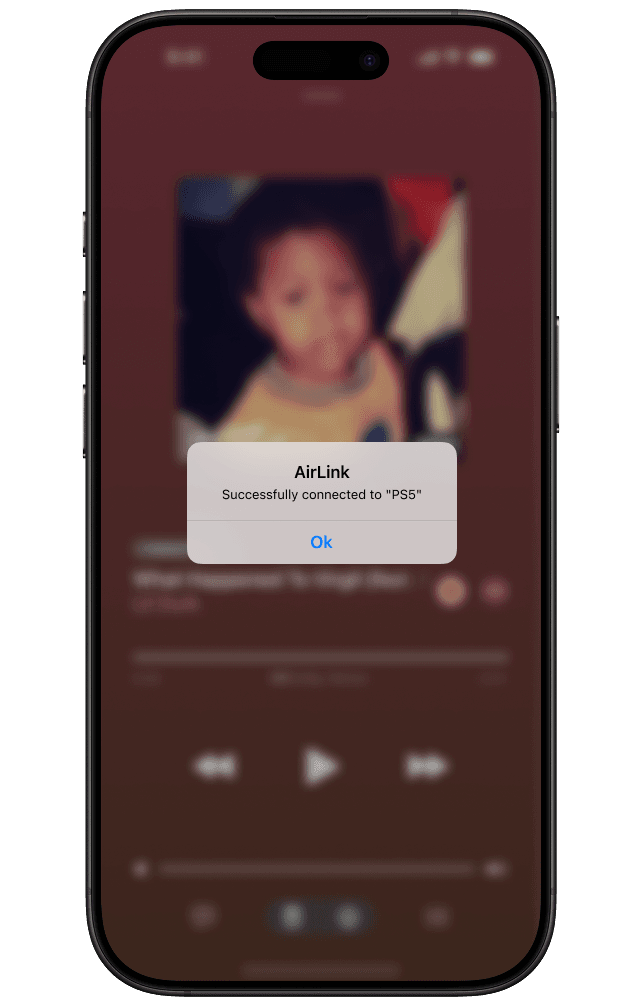
Confirmation Screen
Based on feedback, I have added a confirmation message to let you know when you’re connected to a new device.
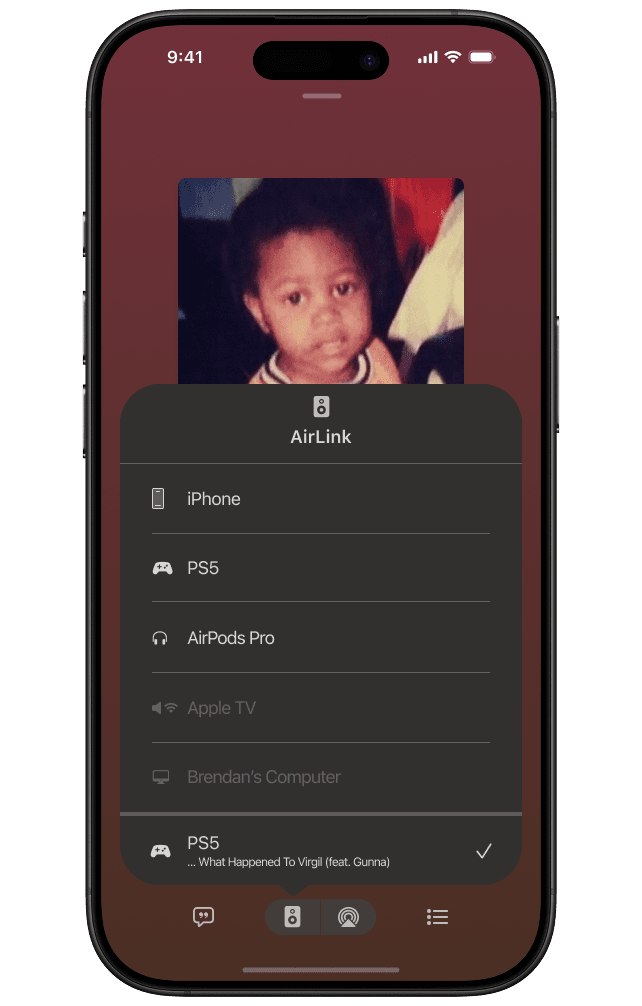
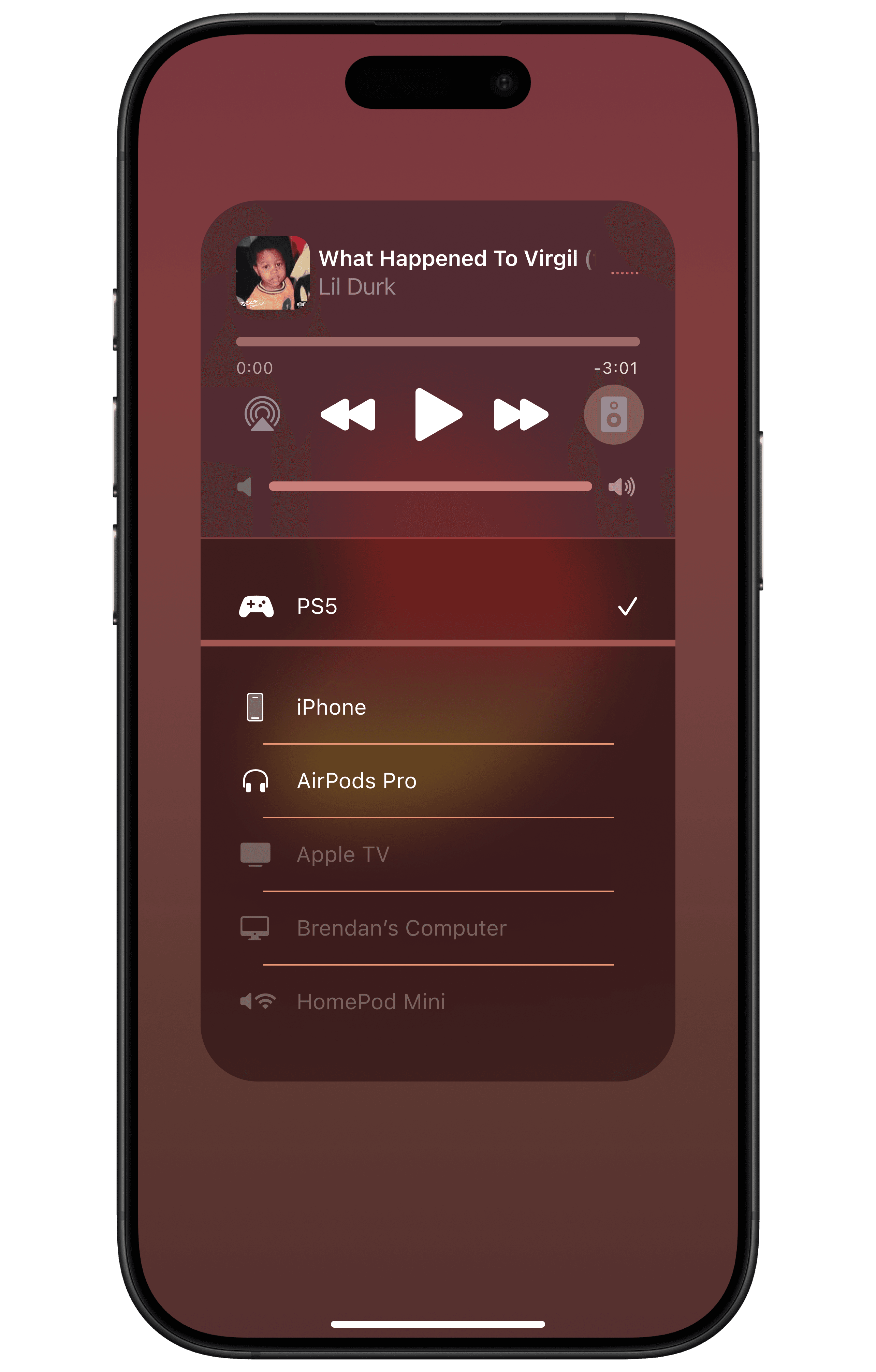
AirLink Menu
I decided to include all devices in the list to show possible links, but devices that are not readily available are disabled.
Control Center AirLink Menu
Similar change to the other menu but for the control center.
Conclusion
Key Takeaways
Designing for multi-device music playback highlighted the importance of clear feedback, visibility, and user confidence. Even small interface details, like confirmation messages and disabled device indicators, can significantly improve usability and reduce frustration. Usability testing with a small group of participants provided actionable insights that guided meaningful design iterations. Additionally, considering collaborative features emphasized how social engagement can shape design decisions for music apps.
Reflection
This project reinforced the value of centering design decisions around real user needs and pain points. I learned that multi-device interactions present unique challenges in consistency and reliability, and that clear interface cues are essential for building user trust. The project strengthened my skills in structuring flows, designing menus, and thinking critically about user frustrations in real-world scenarios.
The Next Steps
Future iterations could explore collaborative playlist features to enhance social usability and test additional multi-device scenarios with a broader participant base to uncover edge cases. I also plan to refine interactions and visual hierarchy to make device switching and playback control more intuitive. Continuing to improve prototyping and testing skills will help validate design decisions and strengthen future projects.